很多人第一次看到 AI Agent 自己编辑文件、跑代码、修 bug,还能一直运行下去的时候,都觉得挺神奇。其实远没有想象中那么复杂。这里没什么秘密算法,也没有什么"智能体大脑"这种玄学概念。
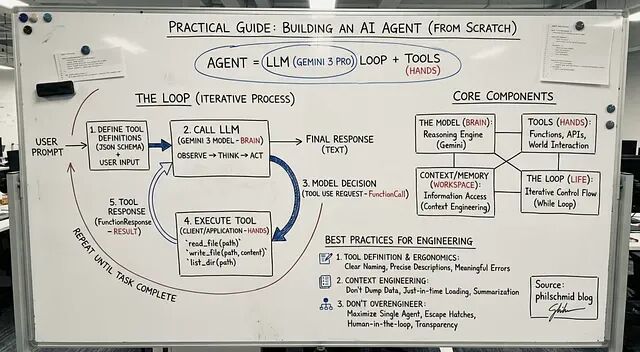
AI Agent核心就三件事:循环 + LLM + 工具函数。
如果你会写个
1while True
2
循环?那基本就算成功一半了。
这篇文章会完整展示怎么用 Gemini 3 搭一个真正能用的 Agent:从最基础的 API 调用,到一个能读写文件、理解需求的命令行助手。
Agent 到底是什么
传统程序就是流程图那一套:步骤 A → 步骤 B → 步骤 C → 结束。
而Agent 不一样,它会根据当前状况决定下一步干什么。可以理解成围绕 LLM 搭的一个小系统,比如说:
- 规划任务
- 执行操作
- 根据结果调整
- 循环往复直到搞定
所以不是写死的脚本,更像是个会思考的循环。
不管多复杂的 Agent,都逃不开这四个部分:
1、模型 负责思考
这里用的是 Gemini 3 Pro。它可以分析用户需求,决定接下来该做什么。
2、工具 负责执行
就是一堆函数:读文件、列目录、发邮件、调 API…想加什么加什么。
3、上下文工作记忆
模型当前能看到的所有信息,怎么管理这块内容,业内叫 Context Engineering。
4、循环 运转机制
观察 → 思考 → 行动 → 重复,一直到任务完成。
就这么四块,没别的了。
循环的运行逻辑
几乎所有 Agent 都是这个流程:
先把可用的工具描述给模型看,然后把用户请求和工具定义一起发给模型。模型会做决策:要么直接回复,要么调用某个工具并传参数。
但是你要写代码负责在 Python 里执行这个工具。
执行完把结果喂回给 Gemini。
模型拿到新信息后继续判断下一步。
就这样循环,直到模型觉得任务完成了。
下面我们开始写:
第一步:基础聊天机器人
先写个 Gemini 3 API 的简单封装 ,其实就是个能记住对话的类。
1 from google import genai
2from google.genai import types
3
4class Agent:
5    def __init__(self, model: str):
6        self.model = model
7        self.client = genai.Client()
8        self.contents = []
9
10    def run(self, contents: str):
11        self.contents.append({"role": "user", "parts": [{"text": contents}]})
12
13        response = self.client.models.generate_content(
14            model=self.model,
15            contents=self.contents
16        )
17
18        self.contents.append(response.candidates[0].content)
19        return response
20
21agent = Agent(model="gemini-3-pro-preview")
22
23response1 = agent.run(
24    "Hello, what are the top 3 cities in Germany to visit? Only return the names."
25)
26 print(response1.text)
27
上面代码能跑,但是就是个聊天机器人。它啥也干不了,因为没有"手"。
第二步:加入工具函数
工具其实就是 Python 函数 + 一段 JSON schema 描述。描述是给 Gemini 看的,让它知道这个函数能干啥。
这里加三个简单的:
read_file- 读文件write_file- 写文件list_dir- 列目录
先写定义:
1 read_file_definition = {
2    "name": "read_file",
3    "description": "Reads a file and returns its contents.",
4    "parameters": {
5        "type": "object",
6        "properties": {
7            "file_path": {"type": "string"}
8        },
9        "required": ["file_path"],
10    },
11}
12
13list_dir_definition = {
14    "name": "list_dir",
15    "description": "Lists the files in a directory.",
16    "parameters": {
17        "type": "object",
18        "properties": {
19            "directory_path": {"type": "string"}
20        },
21        "required": ["directory_path"],
22    },
23}
24
25write_file_definition = {
26    "name": "write_file",
27    "description": "Writes contents to a file.",
28    "parameters": {
29        "type": "object",
30        "properties": {
31            "file_path": {"type": "string"},
32            "contents": {"type": "string"},
33        },
34        "required": ["file_path", "contents"],
35    },
36 }
37
然后是实际的 Python 实现:
1 def read_file(file_path: str) -> dict:
2    with open(file_path, "r") as f:
3        return f.read()
4
5def write_file(file_path: str, contents: str) -> bool:
6    with open(file_path, "w") as f:
7        f.write(contents)
8    return True
9
10def list_dir(directory_path: str) -> list[str]:
11     return os.listdir(directory_path)
12
打包一下就搞定了:
1 file_tools = {
2     "read_file": {"definition": read_file_definition, "function": read_file},
3     "write_file": {"definition": write_file_definition, "function": write_file},
4     "list_dir": {"definition": list_dir_definition, "function": list_dir},
5 }
6
第三步:真正的 Agent
现在把 Agent 类扩展一下,让它能:
- 识别工具调用
- 在 Python 里执行对应的函数
- 把结果传回 Gemini
- 继续循环直到完成
1 class Agent:
2    def __init__(self, model: str, tools: dict,
3                 system_instruction="You are a helpful assistant."):
4        self.model = model
5        self.client = genai.Client()
6        self.contents = []
7        self.tools = tools
8        self.system_instruction = system_instruction
9
10    def run(self, contents):
11        # Add user input to history
12        if isinstance(contents, list):
13            self.contents.append({"role": "user", "parts": contents})
14        else:
15            self.contents.append({"role": "user", "parts": [{"text": contents}]})
16
17        config = types.GenerateContentConfig(
18            system_instruction=self.system_instruction,
19            tools=[types.Tool(
20                function_declarations=[
21                    tool["definition"] for tool in self.tools.values()
22                ]
23            )],
24        )
25
26        response = self.client.models.generate_content(
27            model=self.model,
28            contents=self.contents,
29            config=config
30        )
31
32        # Save model output
33        self.contents.append(response.candidates[0].content)
34
35        # If model wants to call tools
36        if response.function_calls:
37            functions_response_parts = []
38
39            for tool_call in response.function_calls:
40                print(f"[Function Call] {tool_call}")
41
42                if tool_call.name in self.tools:
43                    result = {"result": self.tools[tool_call.name]["function"](**tool_call.args)}
44                else:
45                    result = {"error": "Tool not found"}
46
47                print(f"[Function Response] {result}")
48
49                functions_response_parts.append(
50                    {"functionResponse": {"name": tool_call.name, "response": result}}
51                )
52
53            # Feed tool results back to the model
54            return self.run(functions_response_parts)
55
56         return response
57
这样就可以跑一下试试了:
1 agent = Agent(
2    model="gemini-3-pro-preview",
3    tools=file_tools,
4    system_instruction="You are a helpful Coding Assistant. Respond like Linus Torvalds."
5)
6
7response = agent.run("Can you list my files in the current directory?")
8 print(response.text)
9
如果没问题,Gemini 会调工具,拿到结果,然后给出最终回复。
到这一步,一个能用的 Agent 就搭好了。
第四步:包装成命令行工具
最后我们在再套个输入循环就行:
1 agent = Agent(
2    model="gemini-3-pro-preview",
3    tools=file_tools,
4    system_instruction="You are a helpful Coding Assistant. Respond like Linus Torvalds."
5)
6
7print("Agent ready. Type something (or 'exit').")
8while True:
9    user_input = input("You: ")
10    if user_input.lower() in ['exit', 'quit']:
11        break
12
13    response = agent.run(user_input)
14     print("Linus:", response.text, "\n")
15
代码很少但是效果已经相当不错了。
总结
搭 Agent 一开始看着挺唬人,但理解了结构之后,会发现简单得有点无聊。往简单了说,它就是个循环。一个里面跑着聪明模型的循环。明白这点之后,你就能造出看起来"有生命"的 Agent 了。
如果想继续扩展的话,可以加这些:
网络搜索、数据库查询、执行 shell 命令、调用云服务、长期记忆、工作流编排、任务调度、多步规划…
但不管怎么加,底层还是那个简单结构:
观察 → 思考 → 行动 → 重复
这就是现代 Agent 的核心。
https://avoid.overfit.cn/post/67cef1690eb14d2fb3ecc0ff7bdf91f8


