专栏网址:https://blog.csdn.net/polarisrisingwar/category%5F13089386.html
专栏文章目录:专栏《Python自动化办公的192个实例项目》目录
本篇是《Python自动化办公的192个实例项目》专栏内容,内容主要为使用Python将Word文档导出为PDF格式 & 从Word文档中提取数据(以处理简历为例)。
欢迎关注、评论、提问。
文章目录
- 1. 项目9:将Word文档导出为PDF文档
-
- 准备环境
- 复制即可运行的完整代码
- 核心功能代码
- 2. 项目10:如何用Python从Word中提取数据:以处理简历为例
-
- 准备环境
- 准备测试数据
- 复制即可运行的完整代码
- 核心功能代码
-
- python-docx包
- csv包
- os包
- re包(正则表达式)
- Python对象处理
-
- 字符串处理
* 容器对象处理
- 字符串处理
- python-docx包
1. 项目9:将Word文档导出为PDF文档
准备环境
Python版本需要为3.8-3.14(pywin32的要求)
通过pip下载pywin32:
1pip install pywin32
2
复制即可运行的完整代码
1import os
2from win32com import client as wc
3
4def convert_word_to_pdf(word_path: str) -> str:
5    """
6    将单个Word文档(doc/docx)转换为PDF格式,并返回转换后的文件路径
7
8    Args:
9        word_path (str): Word文件路径
10
11    Returns:
12        str: 转换后的PDF文件路径
13
14    Raises:
15        FileNotFoundError: 如果文件不存在
16        ValueError: 如果文件不是Word格式或路径无效
17        Exception: 转换过程中的其他错误
18    """
19    # 参数验证
20    if not word_path or not isinstance(word_path, str):
21        raise ValueError("文件路径不能为空且必须是字符串")
22
23    # 检查文件是否存在
24    if not os.path.exists(word_path):
25        raise FileNotFoundError(f"文件不存在: {word_path}")
26
27    # 检查文件扩展名
28    valid_extensions = ('.doc', '.docx')
29    if not word_path.lower().endswith(valid_extensions):
30        raise ValueError(f"文件不是Word格式(.doc/.docx): {word_path}")
31
32    # 检查文件是否被占用(临时文件)
33    if os.path.basename(word_path).startswith('~'):
34        raise ValueError(f"文件可能是临时文件: {word_path}")
35
36    # 检查文件大小(避免处理空文件或损坏文件)
37    file_size = os.path.getsize(word_path)
38    if file_size == 0:
39        raise ValueError(f"文件为空: {word_path}")
40
41    word = None
42    doc = None
43
44    try:
45        # 创建Word应用实例
46        word = wc.Dispatch("Word.Application")
47        word.Visible = False
48
49        # 打开文档
50        doc = word.Documents.Open(word_path)
51
52        # 生成新的PDF文件路径
53        base_path = os.path.splitext(word_path)[0]
54        new_path = base_path + ".pdf"
55
56        # 处理文件名冲突
57        count = 0
58        while os.path.exists(new_path):
59            count += 1
60            new_path = f"{base_path}({count}).pdf"
61
62        # 保存为PDF格式(17代表PDF格式)
63        doc.SaveAs(new_path, 17)
64
65        # 验证转换后的文件
66        if not os.path.exists(new_path):
67            raise Exception("转换后的PDF文件未创建成功")
68
69        # 检查转换后的文件大小
70        if os.path.getsize(new_path) == 0:
71            raise Exception("转换后的PDF文件为空")
72
73        return new_path
74
75    except Exception as e:
76        # 清理可能创建的部分文件
77        if 'new_path' in locals() and os.path.exists(new_path):
78            try:
79                os.remove(new_path)
80            except:
81                pass
82        raise e
83
84    finally:
85        # 确保资源被正确释放
86        try:
87            if doc:
88                doc.Close()
89        except:
90            pass
91
92        try:
93            if word:
94                word.Quit()
95        except:
96            pass
97
98
99def main():
100    """主函数:转换单个文件并显示结果"""
101    # 直接在代码中设置要转换的文件路径
102    word_file_path = r"D:\word_files\example.docx"  # 修改为您要转换的Word文件路径
103
104    try:
105        print(f"开始转换文件: {word_file_path}")
106
107        # 转换文件
108        pdf_path = convert_word_to_pdf(word_file_path)
109
110        # 输出成功信息
111        print("\n" + "="*50)
112        print("✓ 文件转换成功!")
113        print(f"原始文件: {word_file_path}")
114        print(f"转换后文件: {pdf_path}")
115        print(f"文件大小: {os.path.getsize(pdf_path)} 字节")
116        print("="*50)
117
118    except FileNotFoundError as e:
119        print(f"✗ 错误: {e}")
120        print("请检查文件路径是否正确")
121    except ValueError as e:
122        print(f"✗ 错误: {e}")
123        print("请确保文件是有效的Word文档(.doc/.docx)")
124    except Exception as e:
125        print(f"✗ 转换失败: {e}")
126        print("可能是Word应用问题或文件损坏")
127
128
129if __name__ == "__main__":
130    main()
131
将代码复制到你的Python编辑器中,并修改D:\word_files\example.docx为您需要转换的Word文件路径即可。转换后的PDF文件与Word文件同名(如果已经存在了同名PDF文件,将加上(count)后缀以避免冲突)
核心功能代码
Word文档导出为PDF的核心功能代码为:
1import os
2from win32com import client as wc
3
4word = wc.Dispatch("Word.Application")
5word.Visible = False
6
7doc = word.Documents.Open(word_path)
8doc.SaveAs(new_path, 17)
9doc.Close()
10
11word.Quit()
12
将word_path对应的Word文档转换为new_path对应的PDF文档。支持doc和docx格式的Word文档。
doc.SaveAs(file_name, file_format)中file_format这个参数表示另存为文档的格式,参考https://learn.microsoft.com/zh-cn/office/vba/api/word.wdsaveformat:
- 17:
wdFormatPDF- PDF格式 - 0:
wdFormatDocument- Microsoft Office Word 97-2003文档格式(.doc) - 16:
wdFormatDocumentDefault- Word默认文档格式(.docx) - 7:
wdFormatPDF- PDF格式(与17相同) - 8:
wdFormatXPS- XPS格式
2. 项目10:如何用Python从Word中提取数据:以处理简历为例
这个简单案例的数据是随机生成的10个格式相同的简历:
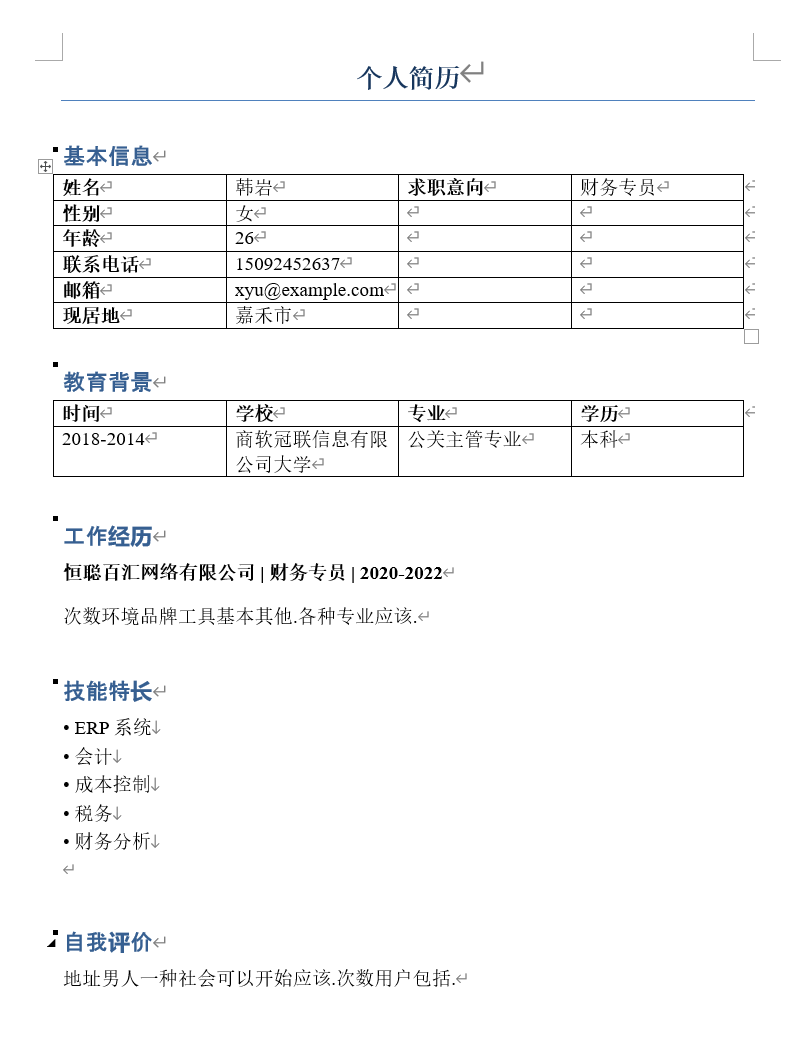
在实际工作中遇到的简历形式会更加多样化,需要根据实际情况来进行分析,甚至可能需要加入适当智能能力。我在此提供的只是一个简单样例,执行代码会解析目录下的所有Word格式简历:从表格中提取基本信息和教育背景,基本信息从表格中指定元素的位置获取,教育背景从表格中逐行获取;工作技能、技能特长、自我评价根据特定小标题和段落格式获取,都基本根据上图中这种格式来进行获取。最后的解析结果会保存到CSV文件中(CSV文件可以用Excel或WPS表格直接打开)。
如果读者在实际工作中遇到了更复杂的需求,也可以通过留言或私聊的方式咨询我获得答疑。
本案例生成测试数据的代码已经放在了下文中。由于是随机生成的,所以每次生成的数据都是不同的。如果您想要在本次案例中的数据,可以私聊我获取文件压缩包。
准备环境
通过pip下载python-docx:
1pip install python-docx
2
准备测试数据
通过pip下载faker:
1pip install faker
2
执行代码(简历文件会下载到工作路径下的resumes文件夹下):
(如果您需要执行这一部分代码的话,还需要注意的是,生成的Word文件默认使用中文宋体+英文Times New Roman格式,一般以中文为默认语言的Windows电脑中都已内置了这两种字体,如果您的电脑设置为其它语言需要注意)
1import os
2import random
3from docx import Document
4from docx.shared import Pt
5from docx.enum.text import WD_ALIGN_PARAGRAPH
6from docx.oxml.ns import qn
7
8from faker import Faker
9
10def set_document_font(doc):
11    """
12    设置文档的默认字体为宋体和Times New Roman
13    """
14    # 设置全局样式
15    style = doc.styles['Normal']
16    font = style.font
17    font.name = 'Times New Roman'
18    font._element.rPr.rFonts.set(qn('w:eastAsia'), u'宋体')
19    font.size = Pt(12)
20
21def set_paragraph_font(paragraph, bold=False, size=12):
22    """
23    设置段落的字体
24    """
25    for run in paragraph.runs:
26        run.font.name = 'Times New Roman'
27        run._element.rPr.rFonts.set(qn('w:eastAsia'), u'宋体')
28        run.font.size = Pt(size)
29        run.font.bold = bold
30
31def generate_resume_docx(filename, resume_data):
32    """
33    生成单个简历Word文档
34
35    Args:
36        filename (str): 保存的文件名
37        resume_data (dict): 简历数据
38    """
39    doc = Document()
40
41    # 设置文档字体
42    set_document_font(doc)
43
44    # 添加标题
45    title = doc.add_heading('个人简历', 0)
46    title.alignment = WD_ALIGN_PARAGRAPH.CENTER
47    set_paragraph_font(title, bold=True, size=16)
48
49    # 添加个人信息表格
50    doc.add_heading('基本信息', level=1)
51    table = doc.add_table(rows=6, cols=4)
52    table.style = 'Table Grid'
53
54    # 填充基本信息表格
55    info_cells = [
56        ("姓名", resume_data['name']),
57        ("性别", resume_data['gender']),
58        ("年龄", str(resume_data['age'])),
59        ("联系电话", resume_data['phone']),
60        ("邮箱", resume_data['email']),
61        ("现居地", resume_data['address'])
62    ]
63
64    for i, (label, value) in enumerate(info_cells):
65        table.cell(i, 0).text = label
66        table.cell(i, 1).text = value
67        table.cell(i, 2).text = "求职意向" if i == 0 else ""
68        table.cell(i, 3).text = resume_data['job_intention'] if i == 0 else ""
69
70        # 设置表格单元格字体
71        for j in range(4):
72            for paragraph in table.cell(i, j).paragraphs:
73                set_paragraph_font(paragraph, bold=(j == 0 or j == 2))
74
75    # 教育背景
76    doc.add_heading('教育背景', level=1)
77    edu_table = doc.add_table(rows=2, cols=4)
78    edu_table.style = 'Table Grid'
79
80    # 表头
81    headers = ["时间", "学校", "专业", "学历"]
82    for i, header in enumerate(headers):
83        edu_table.cell(0, i).text = header
84        for paragraph in edu_table.cell(0, i).paragraphs:
85            set_paragraph_font(paragraph, bold=True)
86
87    # 教育信息
88    edu_table.cell(1, 0).text = resume_data['education']['period']
89    edu_table.cell(1, 1).text = resume_data['education']['school']
90    edu_table.cell(1, 2).text = resume_data['education']['major']
91    edu_table.cell(1, 3).text = resume_data['education']['degree']
92
93    # 设置教育信息行的字体
94    for i in range(4):
95        for paragraph in edu_table.cell(1, i).paragraphs:
96            set_paragraph_font(paragraph)
97
98    # 工作经历
99    doc.add_heading('工作经历', level=1)
100    for exp in resume_data['work_experience']:
101        p = doc.add_paragraph()
102        company_run = p.add_run(f"{exp['company']} | ")
103        company_run.bold = True
104        position_run = p.add_run(f"{exp['position']} | ")
105        position_run.bold = True
106        period_run = p.add_run(exp['period'])
107        period_run.bold = True
108
109        set_paragraph_font(p, bold=True)
110
111        desc_para = doc.add_paragraph(exp['description'])
112        set_paragraph_font(desc_para)
113
114    # 技能特长
115    doc.add_heading('技能特长', level=1)
116    skills_para = doc.add_paragraph()
117    for skill in resume_data['skills']:
118        skills_para.add_run(f"• {skill}\n")
119    set_paragraph_font(skills_para)
120
121    # 自我评价
122    doc.add_heading('自我评价', level=1)
123    self_eval_para = doc.add_paragraph(resume_data['self_evaluation'])
124    set_paragraph_font(self_eval_para)
125
126    # 保存文档
127    doc.save(filename)
128    print(f"已生成简历: {filename}")
129
130def generate_sample_resumes(num=10):
131    """
132    生成指定数量的模拟简历
133
134    Args:
135        num (int): 简历数量,默认为10
136    """
137    fake = Faker('zh_CN')
138
139    # 创建保存目录 - 使用os.path.join处理路径
140    resume_dir = os.path.join('resumes')
141    os.makedirs(resume_dir, exist_ok=True)
142
143    # 职位列表
144    jobs = ['软件工程师', '数据分析师', '产品经理', 'UI设计师', '市场营销', '人力资源', '财务专员', '运营专员']
145
146    # 技能列表
147    skill_sets = {
148        '软件工程师': ['Python', 'Java', 'SQL', 'Linux', 'Git', 'Docker'],
149        '数据分析师': ['Python', 'SQL', 'Excel', 'Tableau', '统计学', '机器学习'],
150        '产品经理': ['Axure', 'Visio', '项目管理', '需求分析', '用户研究', 'PRD编写'],
151        'UI设计师': ['Photoshop', 'Sketch', 'Figma', 'Illustrator', '用户体验设计', '交互设计'],
152        '市场营销': ['市场分析', '营销策划', '社交媒体运营', '内容创作', '数据分析', '品牌管理'],
153        '人力资源': ['招聘', '培训', '绩效管理', '员工关系', 'HR系统', '劳动法'],
154        '财务专员': ['会计', '财务报表', '税务', '成本控制', '财务分析', 'ERP系统'],
155        '运营专员': ['内容运营', '用户运营', '活动策划', '数据分析', '社交媒体', 'SEO/SEM']
156    }
157
158    # 生成简历
159    for i in range(num):
160        # 随机选择一个职位
161        job = random.choice(jobs)
162
163        # 生成简历数据
164        resume_data = {
165            'name': fake.name(),
166            'gender': random.choice(['男', '女']),
167            'age': random.randint(22, 35),
168            'phone': fake.phone_number(),
169            'email': fake.email(),
170            'address': fake.city(),
171            'job_intention': job,
172            'education': {
173                'period': f"{fake.year()}-{fake.year()}",
174                'school': fake.company() + "大学",
175                'major': fake.job() + "专业",
176                'degree': random.choice(['本科', '硕士', '博士'])
177            },
178            'work_experience': [],
179            'skills': random.sample(skill_sets[job], random.randint(4, 6)),
180            'self_evaluation': fake.paragraph(nb_sentences=3)
181        }
182
183        # 生成工作经历
184        num_experiences = random.randint(1, 3)
185        for j in range(num_experiences):
186            start_year = 2020 - j * 2
187            resume_data['work_experience'].append({
188                'company': fake.company(),
189                'position': job,
190                'period': f"{start_year}-{start_year+2}",
191                'description': fake.paragraph(nb_sentences=2)
192            })
193
194        # 生成文档 - 使用os.path.join处理路径
195        safe_name = resume_data['name'].replace(' ', '_')
196        filename = os.path.join(resume_dir, f"简历_{safe_name}_{job}.docx")
197        generate_resume_docx(filename, resume_data)
198
199if __name__ == "__main__":
200    print("开始生成模拟简历...")
201    generate_sample_resumes(10)
202    print("简历生成完成!")
203
复制即可运行的完整代码
简历Word文档在resumes文件夹中,生成的resumes_data.csv就直接在工作路径下:
1import os
2import re
3import csv
4from docx import Document
5
6def extract_resume_info(filepath):
7    """
8    从Word简历中提取信息
9
10    Args:
11        filepath (str): Word文档路径
12
13    Returns:
14        dict: 提取的简历信息
15    """
16    try:
17        doc = Document(filepath)
18        resume_data = {
19            'filename': os.path.basename(filepath),
20            'name': '',
21            'gender': '',
22            'age': '',
23            'phone': '',
24            'email': '',
25            'address': '',
26            'job_intention': '',
27            'education_period': '',
28            'education_school': '',
29            'education_major': '',
30            'education_degree': '',
31            'work_experience': '',
32            'skills': '',
33            'self_evaluation': ''
34        }
35
36        # 提取基本信息
37        basic_info_extracted = False
38        education_extracted = False
39        in_work_experience = False
40        in_skills = False
41        in_self_evaluation = False
42
43        work_experiences = []
44        skills_list = []
45
46        for i, paragraph in enumerate(doc.paragraphs):
47            text = paragraph.text.strip()
48
49            # 跳过空段落
50            if not text:
51                continue
52
53            # 提取基本信息表格
54            if text == '基本信息' and not basic_info_extracted:
55                # 查找所有表格
56                for table in doc.tables:
57                    # 检查表格是否包含基本信息
58                    try:
59                        if table.cell(0, 0).text == '姓名':
60                            resume_data['name'] = table.cell(0, 1).text
61                            resume_data['gender'] = table.cell(1, 1).text
62                            resume_data['age'] = table.cell(2, 1).text
63                            resume_data['phone'] = table.cell(3, 1).text
64                            resume_data['email'] = table.cell(4, 1).text
65                            resume_data['address'] = table.cell(5, 1).text
66                            resume_data['job_intention'] = table.cell(0, 3).text
67                            basic_info_extracted = True
68                            break
69                    except:
70                        continue
71
72                if not basic_info_extracted:
73                    # 如果没有找到表格,尝试从段落中提取
74                    extract_basic_info_from_text(doc, resume_data)
75                    basic_info_extracted = True
76
77            # 提取教育背景
78            elif text == '教育背景' and not education_extracted:
79                # 查找教育背景表格
80                for table in doc.tables:
81                    try:
82                        if table.cell(0, 0).text == '时间' and '学校' in table.cell(0, 1).text:
83                            resume_data['education_period'] = table.cell(1, 0).text
84                            resume_data['education_school'] = table.cell(1, 1).text
85                            resume_data['education_major'] = table.cell(1, 2).text
86                            resume_data['education_degree'] = table.cell(1, 3).text
87                            education_extracted = True
88                            break
89                    except:
90                        continue
91
92            # 提取工作经历
93            elif text == '工作经历':
94                in_work_experience = True
95                continue
96            elif in_work_experience and text and not text.startswith('技能特长') and not text.startswith('自我评价'):
97                # 检查是否是工作经历标题(包含公司、职位、时间,用 | 分隔)
98                if ' | ' in text:
99                    parts = text.split(' | ')
100                    if len(parts) >= 3:
101                        # 提取公司、职位和时间
102                        company = parts[0].strip()
103                        position = parts[1].strip()
104                        period = parts[2].strip()
105
106                        work_experiences.append({
107                            'company': company,
108                            'position': position,
109                            'period': period
110                        })
111                # 否则,可能是工作描述,但我们主要关注标题信息
112
113            # 提取技能特长
114            elif text == '技能特长':
115                in_skills = True
116                in_work_experience = False
117                continue
118            elif in_skills and text and not text.startswith('自我评价'):
119                # 技能特长部分是以 • 开头的列表项
120                lines = text.split('\n')
121                for line in lines:
122                    line = line.strip()
123                    if line.startswith('•'):
124                        skill = line[1:].strip()  # 移除 • 符号
125                        if skill:
126                            skills_list.append(skill)
127
128            # 提取自我评价
129            elif text == '自我评价':
130                in_self_evaluation = True
131                in_skills = False
132                continue
133            elif in_self_evaluation and text:
134                resume_data['self_evaluation'] = text
135                in_self_evaluation = False
136
137        # 如果没有提取到基本信息,尝试其他方法
138        if not basic_info_extracted:
139            extract_basic_info_from_text(doc, resume_data)
140
141        # 将工作经历和技能列表转换为字符串
142        if work_experiences:
143            work_exp_str = " | ".join([
144                f"{exp['company']} ({exp['position']}, {exp['period']})"
145                for exp in work_experiences
146            ])
147            resume_data['work_experience'] = work_exp_str
148
149        if skills_list:
150            resume_data['skills'] = "; ".join(skills_list)
151
152        # 清理数据
153        clean_resume_data(resume_data)
154
155        return resume_data
156
157    except Exception as e:
158        print(f"提取简历信息时出错 {filepath}: {e}")
159        return None
160
161def extract_basic_info_from_text(doc, resume_data):
162    """
163    从文档文本中提取基本信息
164    """
165    for paragraph in doc.paragraphs:
166        text = paragraph.text
167
168        # 提取姓名
169        if not resume_data['name'] and len(text) <= 4 and not any(keyword in text for keyword in ['基本信息', '教育背景', '工作经历']):
170            resume_data['name'] = text
171
172        # 提取电话
173        phone_match = re.search(r'1[3-9]\d{9}', text)
174        if phone_match and not resume_data['phone']:
175            resume_data['phone'] = phone_match.group()
176
177        # 提取邮箱
178        email_match = re.search(r'\b[A-Za-z0-9._%+-]+@[A-Za-z0-9.-]+\.[A-Z|a-z]{2,}\b', text)
179        if email_match and not resume_data['email']:
180            resume_data['email'] = email_match.group()
181
182def clean_resume_data(resume_data):
183    """
184    清理提取的简历数据
185    """
186    # 清理年龄,只保留数字
187    if resume_data['age']:
188        age_match = re.search(r'\d+', resume_data['age'])
189        if age_match:
190            resume_data['age'] = age_match.group()
191
192def save_to_csv(resumes, csv_filename='resumes_data.csv'):
193    """
194    将简历数据保存为CSV文件
195
196    Args:
197        resumes (list): 简历数据列表
198        csv_filename (str): CSV文件名
199    """
200    if not resumes:
201        print("没有简历数据可保存")
202        return
203
204    # 定义CSV列名
205    fieldnames = [
206        'filename', 'name', 'gender', 'age', 'phone', 'email', 'address',
207        'job_intention', 'education_period', 'education_school', 'education_major',
208        'education_degree', 'work_experience', 'skills', 'self_evaluation'
209    ]
210
211    with open(csv_filename, 'w', newline='', encoding='utf-8-sig') as csvfile:
212        writer = csv.DictWriter(csvfile, fieldnames=fieldnames)
213        writer.writeheader()
214
215        for resume in resumes:
216            writer.writerow(resume)
217
218    print(f"简历数据已保存到: {csv_filename}")
219
220def analyze_resumes(directory='resumes'):
221    """
222    分析目录中的所有简历
223
224    Args:
225        directory (str): 简历目录路径
226    """
227    if not os.path.exists(directory):
228        print(f"目录不存在: {directory}")
229        return
230
231    resumes = []
232
233    # 遍历目录中的所有Word文档
234    for filename in os.listdir(directory):
235        if filename.endswith('.docx'):
236            filepath = os.path.join(directory, filename)
237            print(f"正在处理: {filename}")
238
239            resume_data = extract_resume_info(filepath)
240            if resume_data:
241                resumes.append(resume_data)
242
243    # 输出分析结果
244    print("\n" + "="*50)
245    print("简历分析结果")
246    print("="*50)
247
248    # 统计基本信息
249    print(f"共处理简历: {len(resumes)} 份")
250
251    if not resumes:
252        return
253
254    # 按职位意向统计
255    job_counts = {}
256    for resume in resumes:
257        job = resume.get('job_intention', '未知')
258        job_counts[job] = job_counts.get(job, 0) + 1
259
260    print("\n职位意向分布:")
261    for job, count in job_counts.items():
262        print(f"  {job}: {count} 人")
263
264    # 平均年龄
265    ages = []
266    for resume in resumes:
267        if resume['age'] and resume['age'].isdigit():
268            ages.append(int(resume['age']))
269    if ages:
270        avg_age = sum(ages) / len(ages)
271        print(f"\n平均年龄: {avg_age:.1f} 岁")
272
273    # 学历分布
274    degree_counts = {}
275    for resume in resumes:
276        degree = resume.get('education_degree', '未知')
277        degree_counts[degree] = degree_counts.get(degree, 0) + 1
278
279    print("\n学历分布:")
280    for degree, count in degree_counts.items():
281        print(f"  {degree}: {count} 人")
282
283    # 工作经历统计
284    work_exp_counts = {}
285    for resume in resumes:
286        work_exp = resume.get('work_experience', '')
287        if work_exp:
288            # 计算工作经历数量(通过 | 分隔符)
289            count = work_exp.count('|') + 1
290            work_exp_counts[count] = work_exp_counts.get(count, 0) + 1
291
292    print("\n工作经历数量分布:")
293    for count, freq in sorted(work_exp_counts.items()):
294        print(f"  {count} 段经历: {freq} 人")
295
296    # 技能统计
297    skill_counts = {}
298    for resume in resumes:
299        skills_str = resume.get('skills', '')
300        if skills_str:
301            # 按分号分隔技能
302            skills = [skill.strip() for skill in skills_str.split(';') if skill.strip()]
303            for skill in skills:
304                skill_counts[skill] = skill_counts.get(skill, 0) + 1
305
306    # 取前10个最常用技能
307    top_skills = sorted(skill_counts.items(), key=lambda x: x[1], reverse=True)[:10]
308    print("\n最常用技能(前10):")
309    for skill, count in top_skills:
310        print(f"  {skill}: {count} 次")
311
312    # 保存详细数据到CSV文件
313    save_to_csv(resumes, 'resumes_data.csv')
314
315    print(f"\n详细数据已保存到: resumes_data.csv")
316
317if __name__ == "__main__":
318    print("开始提取简历信息...")
319    analyze_resumes()
320    print("简历分析完成!")
321
生成的resumes_data.csv为:
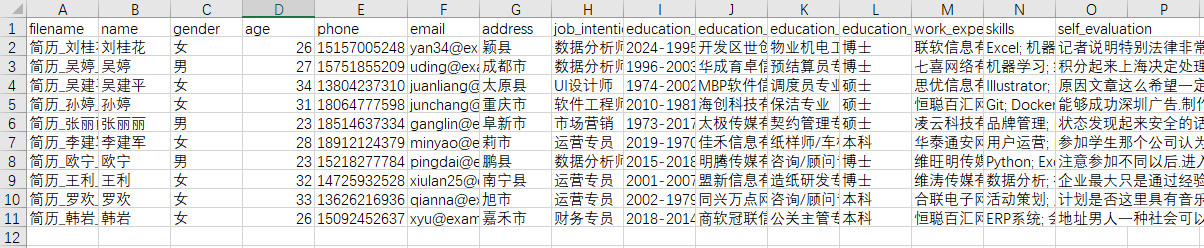
在生成过程中还会在终端输出:
1开始提取简历信息...
2正在处理: 简历_刘桂花_数据分析师.docx
3正在处理: 简历_吴婷_数据分析师.docx
4正在处理: 简历_吴建平_UI设计师.docx
5正在处理: 简历_孙婷_软件工程师.docx
6正在处理: 简历_张丽丽_市场营销.docx
7正在处理: 简历_李建军_运营专员.docx
8正在处理: 简历_欧宁_数据分析师.docx
9正在处理: 简历_王利_运营专员.docx
10正在处理: 简历_罗欢_运营专员.docx
11正在处理: 简历_韩岩_财务专员.docx
12
13==================================================
14简历分析结果
15==================================================
16共处理简历: 10 份
17
18职位意向分布:
19  数据分析师: 3 人
20  UI设计师: 1 人
21  软件工程师: 1 人
22  市场营销: 1 人
23  运营专员: 3 人
24  财务专员: 1 人
25
26平均年龄: 28.3 岁
27
28学历分布:
29  博士: 4 人
30  硕士: 3 人
31  本科: 3 人
32
33工作经历数量分布:
34  1 段经历: 2 人
35  2 段经历: 4 人
36  3 段经历: 4 人
37
38最常用技能(前10):
39  数据分析: 4 次
40  Excel: 3 次
41  机器学习: 3 次
42  SQL: 3 次
43  Python: 3 次
44  用户运营: 3 次
45  活动策划: 3 次
46  SEO/SEM: 3 次
47  Tableau: 2 次
48  统计学: 2 次
49简历数据已保存到: resumes_data.csv
50
51详细数据已保存到: resumes_data.csv
52简历分析完成!
53
核心功能代码
python-docx包
引入环境:from docx import Document
初始化文档对象:doc=Document(filepath)
Document对象就是一个Word文档对象,由一个个段落(paragraph)组成。paragraph中的属性text就是文本(字符串)
从Document对象中,也可以通过tables属性获得表格列表,表格是Table对象。表格可以通过cell(行,列)(行列数都从0开始)获取单元格,每个单元格的属性text就是文本(字符串)
csv包
初始化写入对象:
1writer = csv.DictWriter(csv文件流, fieldnames=列名列表)
2writer.writeheader()
3
写入一行:writer.writerow(dict) 传入字典参数,以列名为键,值会写入CSV
os包
- 从整个文件路径里获取文件名:
os.path.basename(filepath) - 获取文件夹下所有文件的文件名:
os.listdir(directory) - 将文件夹路径和文件名组合为文件路径:
os.path.join(directory, filename)(事实上这个函数可以叠好几层路径,可以从父文件夹叠子文件夹名再叠文件名这样叠成完整路径)
re包(正则表达式)
对正则表达式的详细介绍不在本专栏涉及的范围中。
re.search(pattern,text):搜索文本中第一个符合指定正则表达式pattern的文本,返回值的group()函数返回匹配的字符串phone_match = re.search(r'1[3-9]\d{9}', text)匹配中国大陆手机号码格式
总长度:11位数字
第一位:必须是1
第二位:必须是3-9(排除12开头的特殊号码)
后面9位:任意数字email_match = re.search(r'\b[A-Za-z0-9._%+-]+@[A-Za-z0-9.-]+\.[A-Z|a-z]{2,}\b', text)匹配标准邮箱格式:用户名@域名.顶级域名
用户名:字母、数字、特殊字符
域名:字母、数字、点、减号
顶级域名:至少2个字母
Python对象处理
字符串处理
strip():去除文本开头与结尾的空格、回车等控制符startswith(str):文本开头是否是特定字符串split(分隔符):将文本用分隔符切分开。如果不显式设置分隔符,默认用空格、回车等控制符来切分join(list):将字符串列表组合成一个字符串,用对象文本作为连接词isdigit():如果字符串中所有字符都是数字,返回True
容器对象处理
- 列表
- 直接通过索引切片(
[index])获取对象 append(obj):添加一个对象到列表末尾
- 直接通过索引切片(
- 字典
- 通过键值对格式可以直接创建字典对象:
1{ 2 'company': company, 3 'position': position, 4 'period': period 5}- 通过键名切片可以直接获取值和赋值(如果键名不存在,会直接创建键值对),如
resume_data['self_evaluation'] - 通过
get(key,default_value)获取值,在键(key)不存在时可以返回一个默认值(default_value)
any(obj)如果obj中任何一个元素为True,就返回True
《如何用Python处理文件:Word导出PDF & 如何用Python从Word中提取数据:以处理简历为例》 是转载文章,点击查看原文。
